
Effective April, 2010, there will be new SAP BusinessObjects certification exams available after realignment with the SAP certification program. All existing SAP BusinessObjects exams will be retired at the end of April, 2010 and will be replaced by the following three exams:
• SAP Certified Application Associate – SAP BusinessObjects Enterprise XI 3.x
• SAP Certified Application Associate – Crystal Reports 2008
• SAP Certified Application Associate – BusinessObjects Web Intelligence XI 3.x
In addition to the test delivery via applicable Pearson VUE test centers, the new exams will also be available from April onwards at SAP Education Centers around the world.
For further information on the exams and their availability, please contact to your local SAP Education
The exam codes which should be bookable from mid-March onwards will be:
C_BOCR_08 -> SAP Certified Application Associate – Crystal Reports 2008
C_BOE_30 -> SAP Certified Application Associate – SAP BusinessObjects Enterprise XI 3.x
C_BOWI_30 -> SAP Certified Application Associate – BusinessObjects Web Intelligence XI 3.x
So there will not be anymore SABE201, SABE301 and SABE401 and for Crystal report RDCR201 and RDCR301
The fees will also change according to the SAP standard Associates exams. I’m predicting it will $500, same as for all other SAP Associate Certification Exams, for each of these 3 exams.
Those holding the existing BusinessObjects certification are entitled to use the SAP Associate certification logo and title. The former BusinessObjects Certification branding and logo will no longer be used by SAP or provided to test takers.
I will keep adding more info to this later as it becomes available.
This blog wil be updated almost daily and the topics will be dealing with the daily support of SAP BusinessObjects BI support. So check back daily!
Tuesday, February 23, 2010

Monday, February 22, 2010
SAP BI 7.0 Certification Question - Series 3
This is the continuation of the Q&A that might be in your SAP BI exam. One can find the last series here SAP BI 7.0 Certification Question - Series 2. Keep checking back for later for more questions...
Q6 -> Which of the following objects keeps the aggregate and InfoCube in sync?
This question has only one answer.
A -> Dim pointer
B -> Read pointer
C -> SID pointers
D -> Surrogate pointer
E -> None of the above
F -> All of the above
Q7 -> In which of the following elements can data transformation take place in SAP BW?
This question has more than one answer.
A -> Extract rule
B -> Report result
C -> Transfer routine
D -> Transfer rules
E -> Update rules
I hope this was helpful. I will add few more later as I collect them.
Q6 -> Which of the following objects keeps the aggregate and InfoCube in sync?
This question has only one answer.
A -> Dim pointer
B -> Read pointer
C -> SID pointers
D -> Surrogate pointer
E -> None of the above
F -> All of the above
Q7 -> In which of the following elements can data transformation take place in SAP BW?
This question has more than one answer.
A -> Extract rule
B -> Report result
C -> Transfer routine
D -> Transfer rules
E -> Update rules
I hope this was helpful. I will add few more later as I collect them.
Tuesday, February 9, 2010
Using Import Wizard in BO XI R2 -- Part 1
SAP BusinessObjects describes Import Wizard as "The Import Wizard is a locally installed Windows application that allows you to import existing user accounts, groups, folders, and reports to your new BusinessObjects Enterprise system. The Import Wizard runs only on Windows, but you can use it to import information from a source environment that is running on Windows or UNIX to a new BusinessObjects Enterprise system that is running on Windows or on UNIX"
These steps are very general and can be used as a guide to migrate any report (whether Crystal reports, WebI, DeskI and any other object) from one BusinessObjects system to another in the same landscape. In my case I’m using the example of 3 crystal reports
1) Get the report name:
a) Crystal Report 1
b) Crystal Report 2
c) Crystal Report 3
2) Verify that the reports exist in the QA systems. Logon to QA CMC
http://boeserver/businessobjects/enterprise115/admin/en/admin.cwr and enter the Administrator credentials or any other user with Admin rights


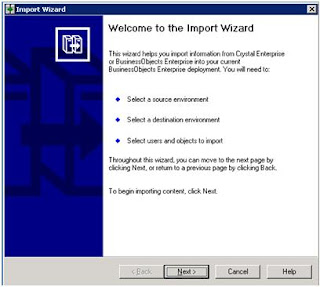

Then click Next. This will bring you to the screen given below
 FIG 4 - Import Wizard – Screen 3
On this screen, fill in the destination server information. Click Next.


These steps are very general and can be used as a guide to migrate any report (whether Crystal reports, WebI, DeskI and any other object) from one BusinessObjects system to another in the same landscape. In my case I’m using the example of 3 crystal reports
1) Get the report name:
a) Crystal Report 1
b) Crystal Report 2
c) Crystal Report 3
2) Verify that the reports exist in the QA systems. Logon to QA CMC
http://boeserver/businessobjects/enterprise115/admin/en/admin.cwr and enter the Administrator credentials or any other user with Admin rights

Fig 1: CMC Logon screen
Now go to the path where the reports are saved: Home > Folders > Reports Home

FIG 2: CMC Reports Home
3) Once verified, logon to the QA BusinessObjects Enterprise Server and open Import Wizard. You should come to this window

FIG 3 - Import Wizard – Screen 1
You can simply click Next on this. On the next screen, select the BusinessObjects source type, type in the server name (cluster name if you have a cluster configured) and supply username and password.

FIG 3 - Import Wizard – Screen 2

On this screen, fill in the destination server information. Click Next.

FIG 5 - Import Wizard – Screen 4

Fig A – All options in select objects to import
On this screen, click the options you want to be migrated. In my case I will select “Import application folders and objects” becaase I needed just the reports. These options are self describable. Click Next.
To be continued >>>>>>>
Saturday, January 30, 2010
SAP BI 7.0 Certification Questions - Series 2
This is the continuation from the last weeks blog SAP BI 7.0 Certification Questions - Series 1. Here again I have just couple of questions. I will add more questions only if I see a demand of it.
Q4 -> Which of the following objects can be used to define aggregates?
There are 2 correct answers to this question.
A -> Navigation Attributes
B -> Display Attributes
C -> Hierarchies
D -> Key Figures
Q5 -> Which of the following considerations is relevant when designing a dimension?
Only one correct answer
A -> InfoObjects that have almost as many different entries in a dimension as the fact table are best assigned in a line item dimension.
B -> InfoObjects that have a semantic or a hierarchical relationship with one another must be assigned to separate dimensions.
C -> InfoObjects that have a semantic relationship to one another must always be collected together in a single dimension.
I will post the answers to these quesions sometime later. Again it depends on the interest level of the readers. Happy reading!
Q4 -> Which of the following objects can be used to define aggregates?
There are 2 correct answers to this question.
A -> Navigation Attributes
B -> Display Attributes
C -> Hierarchies
D -> Key Figures
Q5 -> Which of the following considerations is relevant when designing a dimension?
Only one correct answer
A -> InfoObjects that have almost as many different entries in a dimension as the fact table are best assigned in a line item dimension.
B -> InfoObjects that have a semantic or a hierarchical relationship with one another must be assigned to separate dimensions.
C -> InfoObjects that have a semantic relationship to one another must always be collected together in a single dimension.
I will post the answers to these quesions sometime later. Again it depends on the interest level of the readers. Happy reading!
Saturday, January 23, 2010
Microsoft Office Error
This error was solved by a colleague of mine by the name Syed Shafiq with SBM in Saudi Arabia and I thought I should publish it on my blog. Although this solution might be given on many forums, but I still feel, this will help someone.
Microsoft Outlook 2007 and Microsoft Word 2007 were crashing every time they were opened. He would get the window to close the program with this message “Microsoft Office Word has stopped working “, as given in FIG 01.

There was no apparent reason. Restarting did not help. Repairing Microsoft Office 2007 from control panel did not help either. On the same error message window, if you click on “Problem details”, it gives that wwlib.dll has crashed this program. First we thought of replacing this file from another working machine, as this file seems top have been corrupted. We did not have the proper Admin Rights to copy or replace .DLL files.
We found that it would be easier to replace the corrupted file from registry. Given in FIG 02.
Click Start —> Click Regedit —> follow this path
\HKEY_CURRENT_USER\Software\Microsoft\Office\12.0\Word\Data

Just go ahead, right click and delete. Close MS Outlook/MS Word and the restart the program. This file will get generated again and the error message should not come again.
I hope this will help somebody.
- Touseefuddin Syed
Microsoft Outlook 2007 and Microsoft Word 2007 were crashing every time they were opened. He would get the window to close the program with this message “Microsoft Office Word has stopped working “, as given in FIG 01.

Fig 01: Microsoft Office Word Has Stopped Working Error Message
There was no apparent reason. Restarting did not help. Repairing Microsoft Office 2007 from control panel did not help either. On the same error message window, if you click on “Problem details”, it gives that wwlib.dll has crashed this program. First we thought of replacing this file from another working machine, as this file seems top have been corrupted. We did not have the proper Admin Rights to copy or replace .DLL files.
We found that it would be easier to replace the corrupted file from registry. Given in FIG 02.
Click Start —> Click Regedit —> follow this path
\HKEY_CURRENT_USER\Software\Microsoft\Office\12.0\Word\Data

Fig 02: Registry Editor
I hope this will help somebody.
- Touseefuddin Syed
Tuesday, January 19, 2010
SAP BI 7.0 Certification Questions - Series 1
SAP BI 7.0 certification is a 180 min (3 hours) exam with 90 questions (multiple choice, true and false, etc). The exam code is C_TBW45_70. Exam fee: $500US.
These are some of the certification questions I remember. I will keep adding more as I re-collect. I hope you will find this useful.
Q1 -> The Remodeling Rules Toolbox allows you to do the following:
Select the correct answer(s).
This question has more than one answer.
A -> Add Charachteristics or Add Key Figuers
B -> Change Attributes or Change Aqqreqate
C -> Delete Characteristics or Delete Key Figuers
D -> Replace Characteristics or Replace Key Figuers
E -> Add Navigation Attribute or Add Display Attribute.
Answer: A,C,D
Q2 -> The Remodeling Impact during conversion process, Reading, Querying and changing,
InfoCube is LOCKED.
(True or False)
This question has only one answer.
A -> True
B -> False
Answer: A
Q3 -> Remodeling – User Exit
When implementing custome user exit, the interface IF_RSCNN_EXIT should be used.
(True or False)
This question has only one answer.
A -> True
B -> False
Answer: A
I will add more. Keep checking back.
These are some of the certification questions I remember. I will keep adding more as I re-collect. I hope you will find this useful.
Q1 -> The Remodeling Rules Toolbox allows you to do the following:
Select the correct answer(s).
This question has more than one answer.
A -> Add Charachteristics or Add Key Figuers
B -> Change Attributes or Change Aqqreqate
C -> Delete Characteristics or Delete Key Figuers
D -> Replace Characteristics or Replace Key Figuers
E -> Add Navigation Attribute or Add Display Attribute.
Answer: A,C,D
Q2 -> The Remodeling Impact during conversion process, Reading, Querying and changing,
InfoCube is LOCKED.
(True or False)
This question has only one answer.
A -> True
B -> False
Answer: A
Q3 -> Remodeling – User Exit
When implementing custome user exit, the interface IF_RSCNN_EXIT should be used.
(True or False)
This question has only one answer.
A -> True
B -> False
Answer: A
I will add more. Keep checking back.
How to do a 'quick fix' for InfoView error on BOE server
Quick Fix:
Some users will face this error “An error has occurred: An unknown error has occurred” when trying to access SAP InfoView as given below in Fig 01. This issue is related to combination of this matrix: BO XI R2 SP2 with SAP Integration Kit SP2 on Windows Server 2003 SP2 with SQL Database 2005 SP2. This error message is due to the corruption of SAP InfoView .aspx files sitting in the background of the web server.


Now similar type of messages were listed for files dataWrapper.aspx and data.aspx. So to double check I checked these files in our Support system and found that they’re same. SAP note of similar but not the same error message, recommends to re-install SAP Integration Kit. I did not wanted to do that due to fact that some users are actively working on it and I wanted a quick fix for this.
Special Note: ASPX is the file extension for an ASP .NET active server page. It's a web technology used on Microsoft servers running IIS and ASP.NET. These files can be opened using Text Editor like notepad or Microsoft Visual Studio for editing purposes. It is saved locally because ASPX is essentially a web page with a program running behind it (and that program has to be run from a web server). In our case, these files seems to have been corrupted as the Event Viewer shows the logs.
I found that the file size were respectively 24KB, 2 KB and 2KB each for headerPlus.aspx, dataWrapper.aspx and data.aspx, shown in Fig 03. I compared the sizes of these files with the other BOE system to make sure they have not changed.

- Touseefuddin Syed
Some users will face this error “An error has occurred: An unknown error has occurred” when trying to access SAP InfoView as given below in Fig 01. This issue is related to combination of this matrix: BO XI R2 SP2 with SAP Integration Kit SP2 on Windows Server 2003 SP2 with SQL Database 2005 SP2. This error message is due to the corruption of SAP InfoView .aspx files sitting in the background of the web server.

FIG 01: SAP InfoView with the error message
Just to bring this to the attention of the new users, SAP InfoView is installed with the SAP Integration kit for SAP users to login to the InfoView with their SAP credentials.
A quick look at the Event Viewer gives a details to this issue, given in Fig 02

FIG 02: SAP InfoView with the error message
It shows an error message “Exception message: c\Program Files\Business Objects\BusinessObjects Enterprise 11.5\Web Content\Enterprise115\SAP\InfoView\headerPlus.aspx(619): error CS0103. The name ‘LOGOFF_TOKEN’ does not exist in the current context”
Now similar type of messages were listed for files dataWrapper.aspx and data.aspx. So to double check I checked these files in our Support system and found that they’re same. SAP note of similar but not the same error message, recommends to re-install SAP Integration Kit. I did not wanted to do that due to fact that some users are actively working on it and I wanted a quick fix for this.
Special Note: ASPX is the file extension for an ASP .NET active server page. It's a web technology used on Microsoft servers running IIS and ASP.NET. These files can be opened using Text Editor like notepad or Microsoft Visual Studio for editing purposes. It is saved locally because ASPX is essentially a web page with a program running behind it (and that program has to be run from a web server). In our case, these files seems to have been corrupted as the Event Viewer shows the logs.
I found that the file size were respectively 24KB, 2 KB and 2KB each for headerPlus.aspx, dataWrapper.aspx and data.aspx, shown in Fig 03. I compared the sizes of these files with the other BOE system to make sure they have not changed.

FIG 03: Files who seems to have been corrupted
I simply renamed them as headerPlus_old.aspx, dataWrapper_old.aspx and data_old.aspx. Copied these files from a working BOE system with the same configuration. Restarted the IIS. That fixed the problem.
Please let me know if this was helpful to you or anyone.
- Touseefuddin Syed
Subscribe to:
Posts (Atom)
